A time clock that only works at the building
Clock-in from the app at the job site, forgotten clock-outs caught before payroll, and a manager review where approved hours are the only ones that count.
- Clock-in only from the app, only within the site's geofence
- A forgotten clock-out is prompted for at the next clock-in, and flagged for review
- Managers approve hours per shift; only approved hours reach payroll
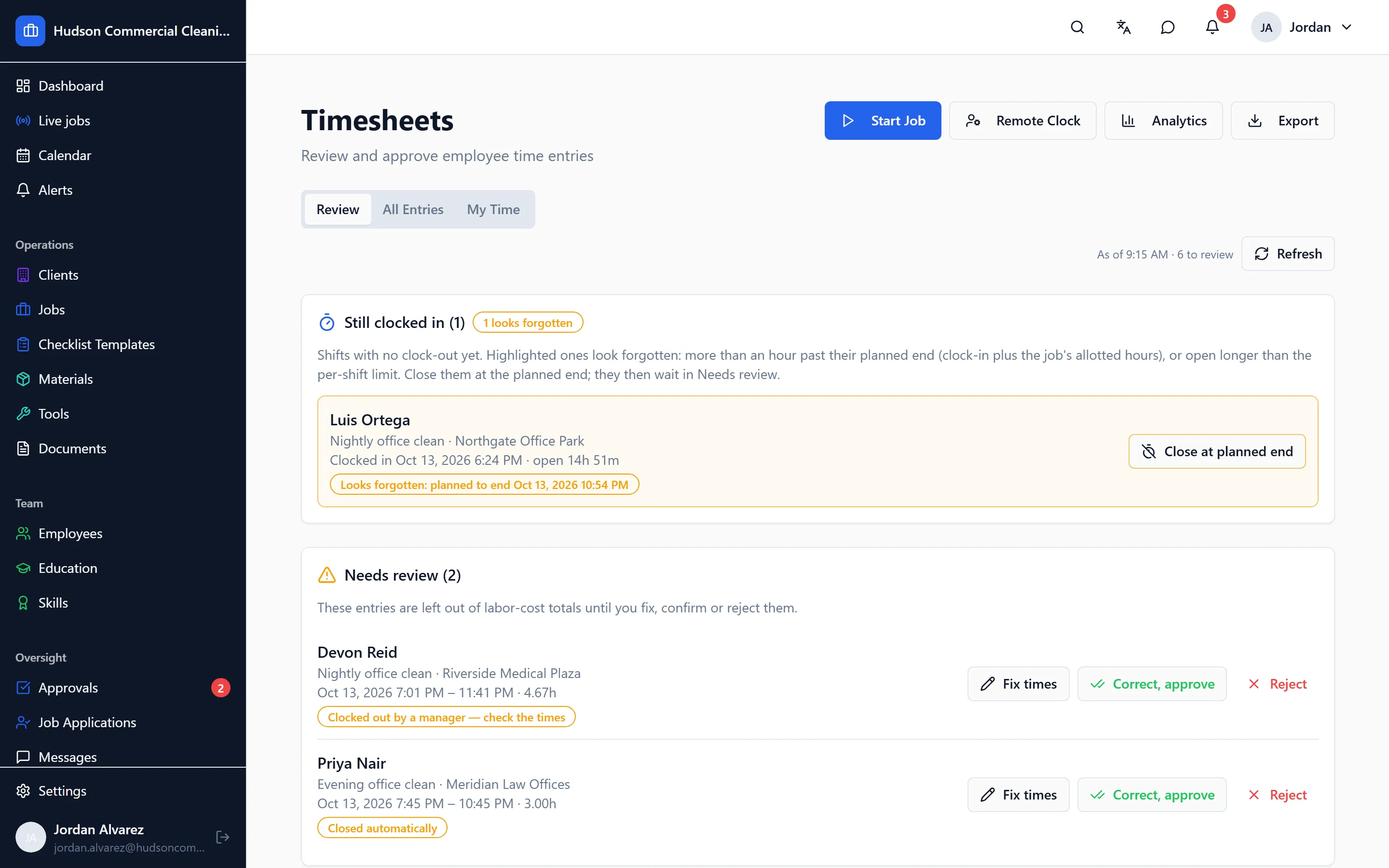
Hours are where a cleaning company’s money goes, and timesheets written from memory are where it leaks. CleanFlow Ops measures the shift from the clock-in that happened at the building, and gives managers a review step before anything is paid.
Clocking in
A worker clocks in from the app, at the site, inside the distance you set around the building. A clock-in attempt from the car park down the road, or from home, is refused with a message that says why. There is no browser clock-in to work around it.
While a worker is clocked in, the app keeps their location so a clock-out from somewhere other than the site can be seen for what it is. Location stops the moment they clock out; it is never tracked off shift.
Forgotten clock-outs
The commonest timesheet error isn’t fraud, it’s forgetting. CleanFlow Ops handles it three ways:
- A shift still open long after the job’s end is shown to managers as open, not quietly extended.
- At the worker’s next clock-in, the app asks about the shift they left open and lets them say when it really ended.
- A shift a manager has to close is marked as a remote close, with the time the manager chose, so it stands out in review.
The meal break rule
If you deduct an unpaid meal break on long shifts, turn the rule on and set the threshold. The deduction is automatic, but the worker is told, and can say they worked through. Their answer never holds up their pay; it goes to the manager with the shift.
Review and approval
Managers review the week’s shifts in one place: hours worked against hours allotted for the job, where each clock-in and clock-out happened, anything flagged. They approve or decline per shift, and every change to a shift is kept in an audit log. Time off, sick days and vacation are requested and approved in the same app.
Payroll
Only approved hours count. If you run payroll on Paychex, approved hours are sent for the pay period from inside the app. If you don’t, you get the same approved list, per person, to enter wherever you run payroll.
Goes with it
Scheduling that matches how cleaning work actually runs
Nightly, weekly and one-off jobs per site, assigned to crews and repeated automatically, with a running-late alert the moment a worker hasn't clocked in.
Checklists with photo proof for every task
Site-specific checklists on the worker's phone, with photos required where you say, time-stamped, and reviewed by a manager before a client sees anything.
A portal your clients can check before they call you
Each client gets a login to see their approved visits, with photos and times, and a place to rate the work or raise an issue.
See it on your own sites
A 30-minute walk-through with your real sites and schedule, not a canned slideshow. If it fits, we set up your account with you.