A portal your clients can check before they call you
Each client gets a login to see their approved visits, with photos and times, and a place to rate the work or raise an issue.
- Clients see approved visits only, with the photos and the time on site
- Ratings, complaints and messages come through the portal, with a record
- History starts the day you give a client access; the past stays private
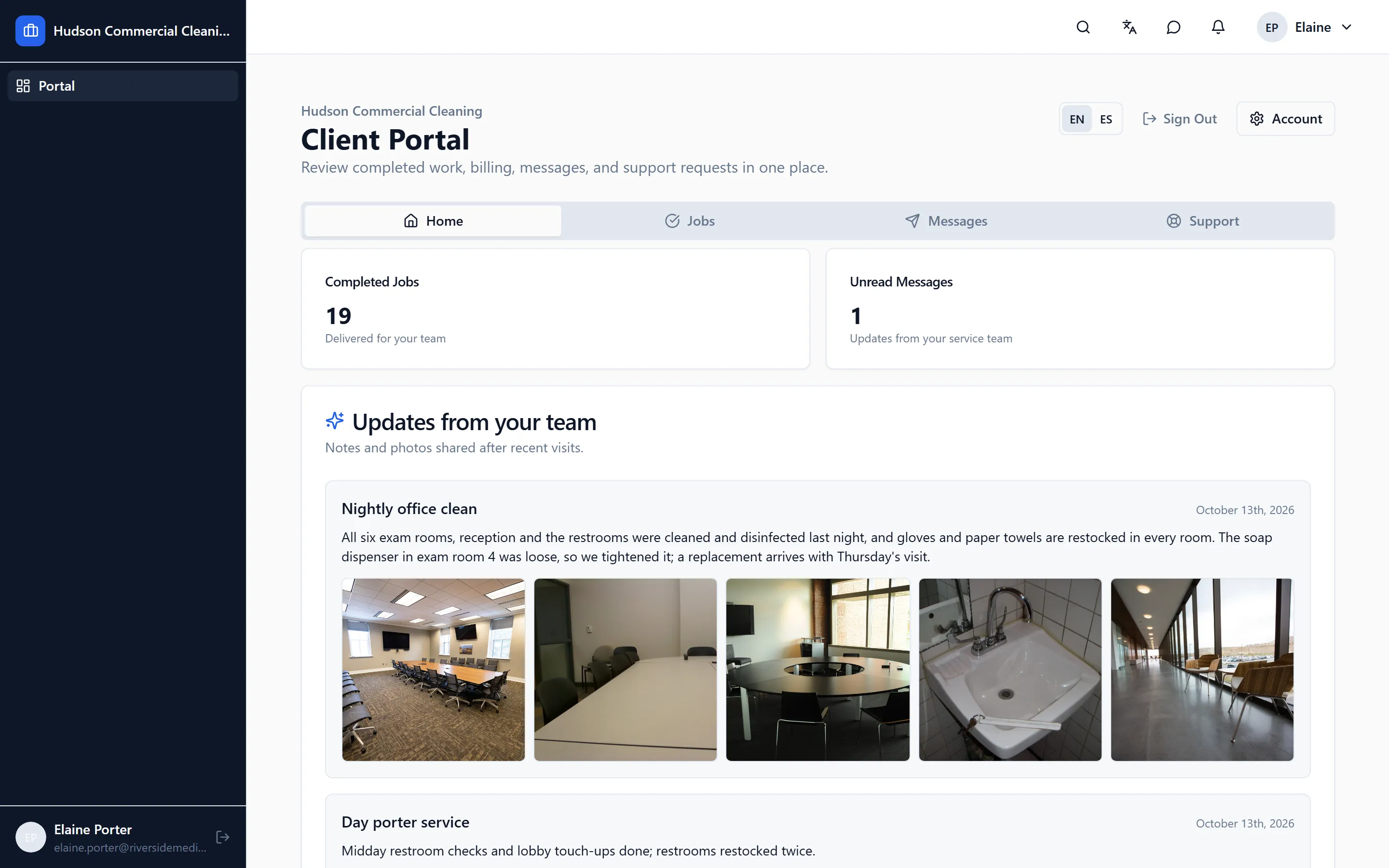
A facilities manager who can see last night’s visit at 7 AM doesn’t need to call you at 9. The client portal shows your clients what was done, when, with proof, and gives them one place to respond.
What a client sees
Each client contact gets their own login. They see their sites and, for each visit, the date, the time the crew was on site, the tasks completed and the photos a manager approved. They can rate a visit, send a message, or raise a complaint, and every one of those lands with your office with the visit attached.
They don’t see the parts that are yours: which worker did what, the hours behind the visit, worker notes, or anything a manager hasn’t approved. If a visit wasn’t completed in full, it isn’t shown as a visit at all.
What the office controls
- Which clients and which contacts have access, and from what date. A client given access in October sees October onwards, not two years of history.
- Which photos are published. Approval is the switch; nothing is public by accident.
- The message that goes with an approved visit. That message is the only free text a client ever reads.
- A “view as client” mode, so a manager can check exactly what a client sees before they see it.
Email reports
Clients who want a summary in their inbox can turn it on for themselves. Those who prefer to look only when there’s a problem can leave it off. Either way, the record is the same.
Logging in without the headache
Client logins work by email, with a short code as a fallback, because corporate email security often eats single-use links. Your clients’ IT departments won’t need to do anything.
Goes with it
Scheduling that matches how cleaning work actually runs
Nightly, weekly and one-off jobs per site, assigned to crews and repeated automatically, with a running-late alert the moment a worker hasn't clocked in.
Checklists with photo proof for every task
Site-specific checklists on the worker's phone, with photos required where you say, time-stamped, and reviewed by a manager before a client sees anything.
A time clock that only works at the building
Clock-in from the app at the job site, forgotten clock-outs caught before payroll, and a manager review where approved hours are the only ones that count.
See it on your own sites
A 30-minute walk-through with your real sites and schedule, not a canned slideshow. If it fits, we set up your account with you.